This image has been floating around Facebook and Twitter for a while now and I really got a kick out of it. I think this is the source of the image: Jay Mug – Stormtrooper Happiness
Geek
Sep 27, 2011
Kill the Facebook ticker with custom CSS
Some reports say that 86% of people hate the new Facebook design, and I bet it’s the ticker that’s the target of everyone’s ire. I did some investigation and found that it was actually not too difficult to kill the ticker.. if you’re willing to get your hands dirty with CSS.
Background for non-geeks: CSS is a language that controls how a web page looks. Luckily, website users like us can also specify our own CSS to override what websites want to show us. In this case, we’ll be using our own CSS to hide the Facebook ticker.
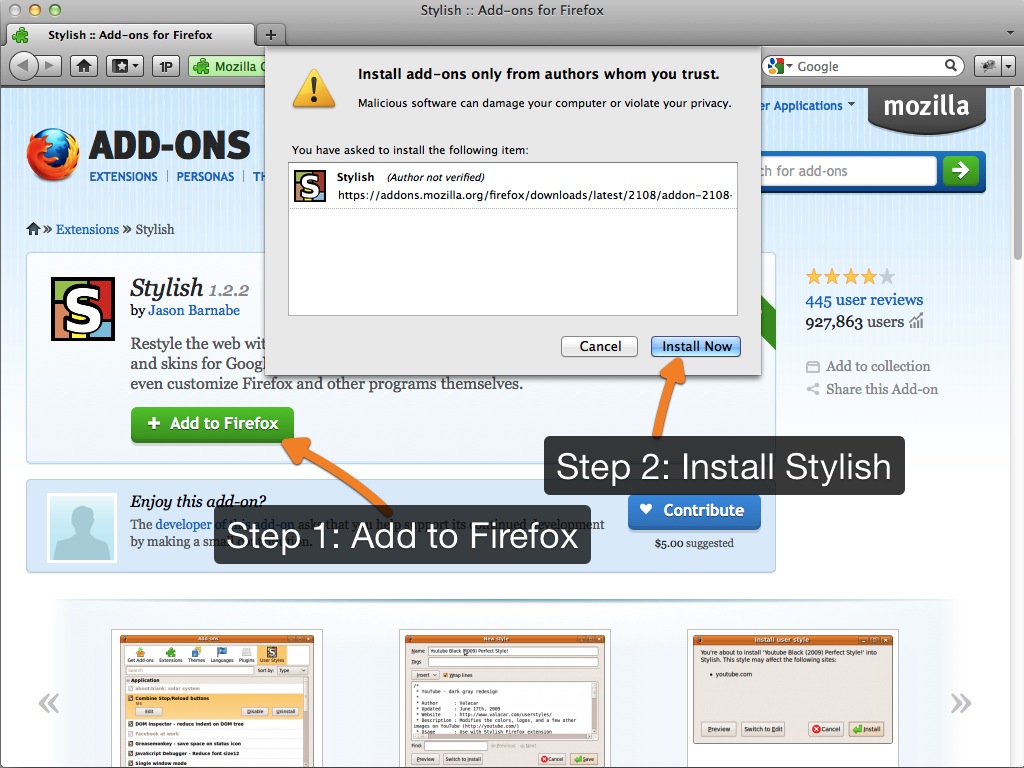
Download the Stylish browser extension
Stylish is a browser add-on that enables us to use our own CSS for specific websites. It’s available for both Firefox and Google Chrome. Safari users can use the User CSS extension. (I’m a Safari user too, but the majority of the world isn’t. Hence the Firefox examples..)
Feb 24, 2011
4 Awesome Tutorials on creating iframe Facebook tabs
Facebook recently revamped their Facebook Pages. One of the biggest effects of this is that you will no longer be able to create custom tabs with the Static FBML application by 11 March 2011. Luckily some people have quickly put out some excellent tutorials and resources to get everyone up to speed.
HyperArts has been publishing a series of tutorials on how to create iframe Facebook tabs.
- Tutorial: Add an iFrame Application to your Facebook Fan Page – 2011 Edition
- Facebook iFrame Apps – Getting Rid of Those Scrollbars
- Customizing your Facebook iFrame Application – Reveal Tabs Fan-gating & Other Cool Stuff
Webdigi shares not only a tutorial, but downloadable examples as well!
Check these articles out and definitely bookmark them to bring yourself up to speed on creating iframe Facebook tabs.
Feb 12, 2011
Weekend Geek Project: Installing a SSD in my MacBook
My MacBook has served me well for 2.5 years. I had been planning to upgrade to a MacBook Pro but after a careful look at my financial commitments – an iPhone 5 upgrade, upcoming renovations and moving in to our new house, plus baby Zack – I decided upgrading to a new MacBook Pro would be burdensome for me. So instead I chose to upgrade the components of my existing MacBook.
I had already upgraded my RAM and replaced the battery, so this time I decided to replace my hard drive with a solid state drive (SSD). Why SSD? A SSD read and writes faster than a regular drive, which results in better performance for doing operations that involve reading and writing files. A SSD also promises better battery life and less heat. Check out this video of a SSD reduces boot times.
Installation Steps
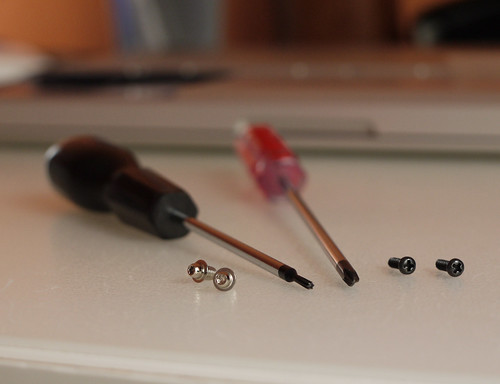
Replacing a hard drive in a MacBook is a simple process that only involves 5 screws. See iFixit’s excellent guide for detailed steps with photos. Update: You can use Carbon Copy Cloner or SuperDuper – both of which are free and excellent – to clone your old hard drive to the new SSD before swapping them. Also, make sure you have the right tools:
- Torx screwdriver (left)
- Philips head screwdriver (right)
Click the images for full resolution versions.
Dec 24, 2010
The Digital Story of Christmas a.k.a. Christmas 2.0
Check out this Christmas Nativity told through social media – tweets, Facebook updates, YouTube, Foursquare check-ins.
Times change, feelings remain the same
Dec 19, 2010
Essential steps to protecting your Unifi network
I recently got Unifi, Telekom Malaysia’s High Speed Broadband service. It’s been awesome so far, but I realized the default configuration that TM installers set up is pretty unsecure. In this article, I’ll show you some essential steps you need to take to protect your Unifi network at home.
Why is the default configuration unsecure?
First, let’s have a look at why you need to protect your network. Or if you’re impatient, jump to the solution.
1. The router uses a default admin password (which is public knowledge)
The D-Link DIR-615 (the orange box) that TM supplies comes with a default password which anyone can find. Just try Googling for “dir-615 default password“.
2. There’s a 2nd ‘secret’ account to the router that many aren’t aware of
Yup, even I wasn’t aware of this – and I’m quite a techie. This 2nd operator account is meant for technicians to easily access your router if you forgot your admin password. Hat tip to the Unifi Handbook for pointing this out to me.
Sep 4, 2010
Simple form validation with FBJS on Facebook Page Tabs
Today I was working on a custom Facebook Page which included a sign up form. On the sign up form was a checkbox with an id of confirmoptin that needed to be checked before the form could be submitted: Continue Reading
Aug 28, 2010
Absolute basic Subversion for newbies with svnX
Update 11 Oct: Someone from the svnX team actually stopped by to add on to my post. See his comments below.
I’m not a programmer, but occasionally need to do programmer type things. One of these things is to use Subversion to keep collaborate on projects with other people. This is a tutorial on how to use Subversion on your Mac, for non-programmers like me. I’ll only cover the basics and what is absolutely necessary to get started with it. Ready? Let’s dive in. Continue Reading
Jun 16, 2010
Now I understand all the fuss about the Kindle
So I got an iPad. Don’t worry, I’ll spare you the fanboy gushing. I actually want to talk about Amazon’s Kindle service.
I’ve been wanting to stop buying paper books for a while now. I’ve also been buying ebooks in PDF and ePub format. Reading these ebooks have been less than ideal because I’ve had to read them on my computer (inconvenient) or on my iPhone (too difficult).
May 23, 2010
Remove Headway update notifications
As you know I’m a big fan of the Headway WordPress theme. So much so I’ve been using it in client projects.
The one (small) drawback is that Headway puts a notice in the Dashboard every time there’s a new version. For certain clients I really don’t want to have anything to do with them after the project, so I would like to disable the notification. Here’s how.
In Headway’s custom_functions.php, simply add this line:
remove_action('admin_notices', 'headway_update_notice');
Solved. No more nagging client asking me what is this “Headway update thing”.