mac

“Copy Address” in Apple Mail without the contact’s name

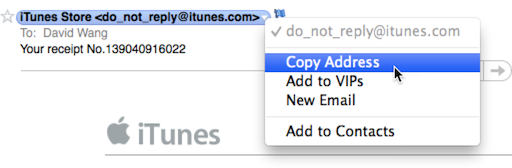
In recent versions of Apple Mail (Snow Leopard onwards to be exact) choosing Copy Address from a contact’s contextual menu would put the contact’s name with the email address in brackets, instead of just the email address. So from the example above, you would get the following on your clipboard:

iTunes Store <do_not_reply@itunes.com>

This is not really helpful when  you really just want to copy the email address, and not fiddle with deleting the extraneous information. Longtime Apple Mail users might also prefer the behavior from versions before Snow Leopard. Luckily there’s an easy way to change the default behavior and only copy the email address without the contact’s name.

Start by quitting the Mail app. Then launch Terminal and type (or copy and paste) the following command (all on 1 line):

defaults write com.apple.mail AddressesIncludeNameOnPasteboard -boolean No

Now when you open up Mail again, copying and address will only give you the email address without the contact’s name. Yay!

If you want to revert back to the default behavior, quit Mail and run the command in Terminal again but switch the last word to Yes.

Fantastical vs Quickcal

I’ve been evaluating Fantastical and Quickcal side by side for the past week. I would have gone with the cheaper Quickcal, but Fantastical’s CALDAV syncing won me over. I might switch to Quickcal when they do add CALDAV syncing.

TieSight – super clever Mac app

Here’s one of the more clever Mac app that I’ve come across lately. TieSight is an app that helps you tie the perfect necktie knot using your Mac’s iSight camera. How cool is that?

I don’t wear neckties myself but I could see myself using this app. It’s also really affordable at only $0.99. Check out the official website or directly on the Mac App Store.

Mailplane

Just bought my Mailplane license with free Family option upgrade because I was a beta tester. Check out Mailplane.

Goodbye, cruel Word

Goodbye, cruel Word: Author Steven Poole on switching away from Word after more than a decade of using it as his primary writing tool. I’m seriously considering dumping Microsoft completely when I get my new Mac.

Follow

Get every new post delivered to your Inbox

Join other followers:

%d bloggers like this: