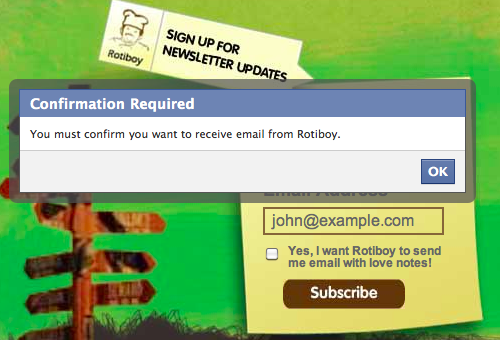
Today I was working on a custom Facebook Page which included a sign up form. On the sign up form was a checkbox with an id of confirmoptin that needed to be checked before the form could be submitted:
<form action="http://.." method="post" id="subForm" onsubmit="return validate_signup(this)"> <!-- email address --> <input class="text" type="text" name="email" id="email" /><br/> <!-- checkbox to confirm opt-in --> <input class="checkbox" type="checkbox" id="confirmoptin" name="confirmoptin" /> <label for="confirmoptin">Yes, I want to receive email!</label><br/> <input type="submit" value="Subscribe" /> </form>
With plain ol’ JavaScript, you can easily do a simple validation. This code will show a JavaScript alert window if the user didn’t tick the checkbox:
<script type="text/javascript">
function validate_signup(form) {
if ( !document.getElementById('confirmoptin').checked ) {
alert("You must confirm that you want to receive email from us");
return false;
}
return true;
}
</script>
On Facebook Pages, plain ol’ JavaScript is not allowed. Instead you have to use FBJS, which is very similar, but has got some modifications so it works with FBML and prevents dangerous hacks.
In the example above, the alert() function and checked object is not supported in FBJS. The code below translates these two unsupported functions into Dialog and getChecked respectively:
<script>
<!--
function validate_signup(form) {
	if ( document.getElementById('confirmoptin').getChecked() == false ) {
		(new Dialog()).showMessage('Confirmation Required', 'You must confirm you want to receive email from Rotiboy.');
		return false;
	}
return true;
}
//-->
</script>
</script>
In plain English, the code above is triggered when a user tries to submit the form. The code looks for the element with the id of confirmoptin and checks if it is checked (selected). If it is not selected (false), display the Confirmation Required message in a Facebook-style dialog box (pictured at the top of this article) and prevent the form submission. If it is checked, just return true and submit the form.
Hopefully the code above will help a few people who are scratching their head about the same thing. See the form in action on the Rotiboy Malaysia Welcome Tab.



Thank you very much. I wish you become successfull in your career.
Thanks
Polat
Are you using this form with AJAX? I have a similar set up that circumvents the access permissions request and submits the data to the FBJS Ajax call. However, when I try to implement a wrapper that validates the form data then, if there are no errors, it submits the form via FB Ajax to a PHP file on our server; it simply fails to submit or sends the user to the page directly – no Ajax submission takes place. Can you assist me on this issue?
Hi Breklin, no I’m not submitting the form via AJAX. This tutorial only talks about validating the form with FBJS.
Actually I’m not sure you can submit AJAX calls from Facebook pages – you should double check that.
My site is built with headway and I would like the form to use Ajax so the subscriber can subscribe without leaving the current page.
I can add html and php using a leaf but not sure how to employ javascript with headway. Most of the solutions I’ve seen use Javascript. Any ideas how to make this work?
Hi Kenny, the J in AJAX stands for JavaScript so you definitely need it. If your JS is enclosed in
<script type="text/javascript">...</script>you can paste it into the HTML/PHP leaf. Ask the friendly people in the support forum for more details. Good luck!